Your future mother-in-law texted your partner at 11:47 p.m. with a list of fourteen people “we simply cannot leave off,” and now you’re staring at a spreadsheet that was not built to hold any of this. Most couples assume a wedding guest list template is just a name-and-address form — fill it in, mail the envelopes, done.
It is not. Not even close. The real list is a financial document, a family negotiation log, and a vendor-deadline tracker all crammed into one sheet nobody gave you instructions for. We learned that the hard way watching a friend in Portland nearly blow up her engagement over exactly this — her soon-to-be mother-in-law had quietly promised seats to cousins the couple had never met, and none of it was written down anywhere in a way that gave the couple any standing to push back. When the caterer called for a final headcount, she had no idea whose names were confirmed, whose were conditional on a check arriving, and whose were a surprise entirely.
That’s not a communication problem. That’s a missing-fields problem. A template built only for names lets every other variable live in someone’s head — which is exactly where it turns into a fight.
What fields does a wedding guest list template actually need?
A complete wedding guest list template needs at minimum: household ID, individual name, relationship/role, contact info, invitation metadata (save-the-date sent, invite type, RSVP deadline), a separate RSVP status field distinct from a final-attendance flag, plus explicit plus-one and children fields. Zola’s 2025 First Look Report found that 82% of couples consider uninvited plus-ones unacceptable guest behavior — which means if your template doesn’t have a named plus-one column, you’re making that conflict inevitable rather than preventable.
Copy this wedding guest list template
One row per person, grouped by household. Paste the header row into Google Sheets or Excel and you’re set up.
| Household | Guest | Side | Tier | Plus-one | Child | Save-the-date | RSVP | Final attending | Meal / dietary | Table |
|---|---|---|---|---|---|---|---|---|---|---|
| H01 | Sam Rivera | Partner A | A | Yes | No | Sent 03/02 | Yes | Yes | Chicken | 4 |
| H01 | Sam’s plus-one | Partner A | A | (guest) | No | n/a | Yes | Yes | Veg | 4 |
| H02 | Pat Lee | Partner B | B | No | No | Sent 03/02 | Pending | — | — | — |
| H03 | Jordan Kim | Parents’ list | C | No | Yes | Not sent | — | — | — | — |
Tier: A = must invite. B = invite if A-list guests decline or the budget allows. C = only if there’s room.
RSVP vs. final attending: keep both. Someone can RSVP yes and not show up, and your caterer bills the final number.
Also add these columns once the basics are in: mailing address, email or phone, invitation type (paper or digital), who is paying for this guest, gift received, thank-you sent.
Rather not manage it in a spreadsheet? The free Big Day wedding planner has a guest list with RSVP tracking and a seating chart built in.
Here’s how to think about each column group:
Core identity block: Household ID is the field most templates skip and the one you’ll miss most. Grouping by household means one RSVP link covers a couple or family unit, your envelope count is accurate, and when someone RSVPs for their whole table, you’re not hunting across fourteen rows to mark them attended. Individual name rows sit inside each household group.
Invitation metadata: Save-the-date sent (date, not just Y/N), invitation type (paper vs. digital), RSVP deadline, RSVP link per household. Keep RSVP status and final-attended status as two completely separate columns. They are not the same thing: someone can RSVP yes and not show up, which matters when your venue’s guaranteed minimum is calculated on a per-head basis.
Plus-one and children fields: Four columns, not one: plus_one_allowed (Y/N), plus_one_named (text field), children_allowed (Y/N), child_names_ages. The named field is not optional. An unnamed plus-one is an open invitation to exactly the situation Zola flagged. If you’re working through your plus-one rules and who qualifies, our breakdown of wedding plus-one etiquette covers the decision logic in detail.
Decision and funding flags: payer_funder (who put this person on the list), conditional_funding (Y/N), must_invite tag, priority_owner (Bride / Groom / Parent A / Parent B). More on these in the next section — but they belong in the core schema, not a separate document.
Logistics and admin columns: meal choice, dietary restrictions, accessibility needs, seating ID, travel and accommodation notes, gift tracking, final_attended (Y/N). That last one feeds your vendor reconciliation directly.
Bestie aside: The household ID column saved a friend’s Portland spreadsheet from complete collapse. She had 74 rows for 38 households — without the grouping, her RSVP response rate looked like 31% when it was actually 79%. Her caterer was about to panic-call her. One column, totally worth it.
How do you encode conditional funding, parent priorities and in-law requests so they don’t hijack the guest list?
Add a funding block directly to your template: conditional_funding (Y/N), funding_amount, funding_deadline, funder_contact, and final_authority. Then add an owner block for every row: owner_tag (Bride/Groom/Parent A/Parent B/In-law), owner_quota (seats allocated to that owner), and a running count per owner. According to The Knot’s 2026 Real Weddings Study, the average wedding hosts 117 guests at $292 per head — so every seat a parent adds without your sign-off is roughly $292 in costs you may not have budgeted for.
The conditional funding flag is the one that does the most work. When a parent says “I’ll cover the catering for my side,” that is a contract, not a gesture. The template makes it an actual record: funding_amount, funding_deadline (the date by which payment is confirmed), and a rules column with an if-funded-then-invite checkbox. If the deadline passes and the check hasn’t arrived, the row stays in a “pending” filter, not the confirmed list. That filter is not passive-aggressive — it’s just accurate.
Owner quotas work the same way. Assign a seat number to each owner at the start: “Parent A gets 18 seats, Parent B gets 14.” The running count column shows in real time when someone is over quota. Adding guests beyond their number requires a formal addition and a sign-off in the sheet, not a text message at midnight.
Before any parent-submitted name moves to “invited” status, require written confirmation in the sheet: a timestamp and the name of who approved it. That’s not bureaucratic. It’s the difference between having a conversation and having documentation when the conversation gets contested later. For a broader look at how vendor decisions connect to the same paper trail, the wedding vendor guide covers the documentation habits that prevent post-signing surprises.
His Take: The first parent round is the one where everyone is still being polite, which makes it the exact moment to set the quota in writing — because polite is temporary and spreadsheets are permanent. I’d rather have an uncomfortable five-minute conversation about seat limits in month one than a real fight at month eleven when the venue asks for a final headcount and both sides of the family think their list is confirmed.
What benchmark numbers should you pre-fill — and what numbers are NOT safe to assume?
Pre-fill your template’s per-guest cost field with $292 as a starting placeholder — that’s the average spend per guest from The Knot’s 2026 Real Weddings Study across 10,474 couples who married in 2025. Use it for early scenario modeling only. Overwrite it with your actual vendor quotes the moment you have them, because $292 is an all-in national average, not a catering price.
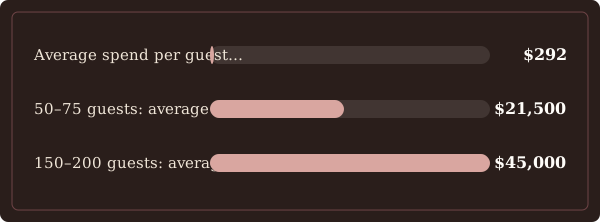
Here’s what the benchmark set looks like for scenario modeling:
| Metric | Figure | Source |
|---|---|---|
| Average guest count (national) | 117 | The Knot 2026 |
| Average spend per guest (all-in) | $292 | The Knot 2026 |
| 50–75 guests: average total cost | $21,500 | Zola 2025 |
| 150–200 guests: average total cost | $45,000 | Zola 2025 |
| Midwest average guest count | 140 | The Knot / Bespoke Bride |
| South/Southeast average guest count | 102 | The Knot / Bespoke Bride |
| International destination average | 69 | The Knot / Bespoke Bride |
What these numbers are not: $292 includes photography, florals, entertainment and every other line on a typical wedding invoice. If you use it as a catering-only estimate, you will under-budget significantly. Build per-vendor cells in your sheet: venue fee, catering per-person, bar per-person, taxes, service charge percentage, gratuity percentage. Each of those cells gets populated from the actual contract, not from a benchmark.
Three numbers the research does not yet support: the percentage of couples who invite children, the percentage of guests granted plus-ones, and the average RSVP no-show rate. Both The Knot and Zola flag these as areas of guest-list friction, but verified percentages weren’t available in either report’s public release. Don’t fill those cells with guesses. Instead, include a “notes: contract penalty” cell next to your guaranteed minimum row — once you’ve reviewed your venue contract (our wedding contract template guide walks through what to look for in that clause), you’ll have the actual attrition terms to plug in.
How should the template support workflow milestones, version control and vendor deadlines?
Your guest list template needs a milestone tab with one row per checkpoint, a sign-off owner, and a date field for each. The Knot and Zola data both confirm that guest count drives cost pressure — but the research did not surface verified planner-recommended timing windows, so the deadline cells in your template should be built as fill-in fields, not pre-populated numbers. Your venue contract and your planner’s schedule are the sources for actual dates; the template’s job is to hold them once you have them.
The milestone fields to include from day one:
- initial_draft_date — when the first list goes into the sheet
- parent_review_deadline — the date by which each owner’s additions are locked
- save_the_date_freeze — no new names after this point without written approval
- invitation_send_date — tracked per batch if you’re sending in rounds
- rsvp_cutoff — the date guests must respond by
- vendor_final_count_deadline — pulled directly from your venue contract
- seating_lock_date — when table assignments stop moving
- final_payment_date — the contract deadline for the reconciled headcount invoice
Every milestone row carries a signoff_owner field and a signoff_date. Any row submitted by a parent or in-law stays flagged as “pending couple review” until one of you explicitly approves it in the sheet. This is not about distrust — it’s about having a single source of truth when a vendor calls and asks for your final number and both families have a different one memorized.
Version control: add a change_log tab. Every time a row is added, removed, or modified, log: who changed it, what changed, and when. Add a last_modified_by and last_modified_timestamp field to every main row as well. When your caterer asks for an export, filter to attendance_confirmed = Y and export guest name, meal choice, and dietary restrictions only. That is the format most venues and caterers actually want, and having it ready to pull in one click saves a genuinely unpleasant scramble the week before the wedding.
How to use the guest list sheet to produce budgets, feed contracts, and prevent last-minute surprises
Build budget columns directly into the sheet so every headcount change automatically recalculates your projected spend. Use The Knot’s $292-per-guest figure and Zola’s cost bands as labeled placeholders — mark them “illustrative, verify with contract” — then overwrite each cell once you have real vendor numbers. A guest list that doesn’t connect to a budget is just a contact list; a guest list tied to cost columns is a planning document.
The budget columns your sheet needs, per row or per vendor section:
- per_vendor_per_person_cost — filled from contract once signed
- fixed_vendor_fee — room rental, setup, equipment: costs that don’t change with headcount
- taxes_service_pct — percentage pulled from contract (service charges vary significantly by venue)
- gratuity_pct — separate from service charge; not always included automatically
- projected_total_by_row — formula: (per-person cost × confirmed count) + fixed fee
- reconciled_total_after_rsvp — updated once RSVP cutoff passes and final count is locked
For contract penalty tracking, add: guaranteed_minimum (the headcount floor below which you still pay full price), attrition_policy_summary (plain-language note on what happens if attendance drops), overage_fee_per_person (what each guest above the original estimate costs), reduction_deadline (last date you can reduce headcount without penalty), and deposit_nonrefundable. Funny how the non-refundable clause is always written by the one side that gets to keep the money — which is exactly why you want it in your own document, not only in theirs.

Day-of reconciliation columns: RSVP_count (how many said yes), actual_attended (door count), no_show_count (the gap), and a variance formula that ties to your vendor payment row. When you get the final invoice, you want to be able to show in thirty seconds whether the headcount the venue charged you matches the headcount your sheet recorded. Discrepancies happen — having the receipts in your own file is how you catch them.
Optional but worth including if parents are bringing out-of-town guests: gift_tracking (for thank-you note follow-up) and travel_accommodation (hotel block, shuttle logistics). These columns don’t affect the vendor count but they do prevent the thank-you-note chaos that hits about three weeks after you get back from the honeymoon. If the overall juggle of tracking all of this alongside your other planning tasks is getting to be a lot, the free wedding planner has a budget tracker built to sit alongside a guest list like this one — it’s there for the moment the spreadsheet starts to feel like a second job.
The Catch: Your venue’s “guaranteed minimum” clause is not the headcount you expect to hit — it’s the headcount you’re contractually required to pay for regardless of who actually shows up, so building your guest list budget around your RSVP count without reading that clause first can leave you owing for tables that sat empty.
The wedding day timeline template is worth mapping alongside the guest list milestones once your headcount is locked — the two documents share several of the same vendor deadlines, and having them on the same schedule prevents a situation where the timeline is finalized before the seating chart is.
Build the template around the real levers, not the polite ones
Most wedding guest list templates are built for an idealized version of the process — the one where everyone agrees, no one adds names after the deadline, and the only question is whether Aunt Carol wants the salmon or the chicken. The actual process involves a funding conversation with at least one parent, a plus-one policy someone is going to push back on, a caterer’s guaranteed minimum clause you haven’t read yet, and a headcount that will change four times between now and the week before the wedding.
The template fields in this post — conditional funding flags, owner quotas, milestone sign-offs, budget reconciliation columns — exist because those are the real variables. Encoding them in the sheet doesn’t create conflict; it moves the conflict from a midnight text thread into a document where both of you have standing to say “this is what we agreed to.”
If you want a planner that holds the guest list, the budget, the vendor timeline, and the family-politics paper trail in one place without requiring you to build it yourself from scratch, the BigDay Classic Edition is built for exactly that stack of moving parts. It’s the version we’d hand a friend on the phone at 11 p.m. when the mother-in-law text just landed.
FAQ
What is the average guest count and cost per guest I should use for early budgeting?
Use 117 guests and $292 per guest as your starting placeholders, per The Knot’s 2026 Real Weddings Study covering 10,474 couples married in 2025. Regional averages vary significantly: Midwest weddings average 140 guests, while international destination weddings average 69. The $292 figure is an all-in average (venue, catering, photography, florals, everything) divided by guest count — it is not a per-plate catering price, and it should be replaced with actual vendor quotes as soon as you have signed contracts.
Should I track households or individual guests?
Both, in separate data layers. Household grouping handles invitation logistics: one RSVP link, one envelope, one row for whether a household responded. Individual rows handle everything else: meal choices, dietary restrictions, attendance confirmation, plus-one names, and gift tracking. Zola’s 2025 data supports treating these as distinct data points — collapsing them into a single row per person creates duplicate RSVP management headaches and makes your headcount harder to reconcile against vendor invoices.
How should I track plus-ones and children in the template?
Four dedicated fields: plus_one_allowed (Y/N), plus_one_named (text), children_allowed (Y/N), child_names_ages (text). Zola’s 2025 First Look Report found that 82% of couples consider asking to bring an uninvited plus-one unacceptable behavior — which means the tension is already there before your wedding. An unnamed “plus-one” column doesn’t prevent uninvited guests; a named field with a Y/N eligibility flag does. For the full decision logic on who gets a plus-one in the first place, the wedding plus-one etiquette post covers the criteria couples actually fight over.
Can the template handle parental funding or “I’ll pay for X guests” situations?
Yes, and it should. The fields to add: conditional_funding (Y/N), funding_amount, funding_deadline, funder_contact, owner_tag, owner_quota, and a signoff_date before any conditionally-funded name moves to confirmed status. Conditional parental funding is one of the most common sources of guest-list friction — the template turns a verbal commitment into a documented one, which is the only version that holds up when a vendor calls for a final headcount and a parent insists their fourteen guests are confirmed. Note: exact contract language and verified case examples from planners are sourced separately; the fields above reflect the operational logic the template needs to hold regardless of how the family conversation goes.